Integrations (Email Domains)
Command Center/fire/admin/integrations/custom-domains
0/26 covered
0%
Details
tenant:
cy-chat.chilipiper.inIntegrations → Email Domains. 3-step setup: Enter Domain → Add DNS Records → Verification. Each step collapsible. No test-ids.
Open in testing ↗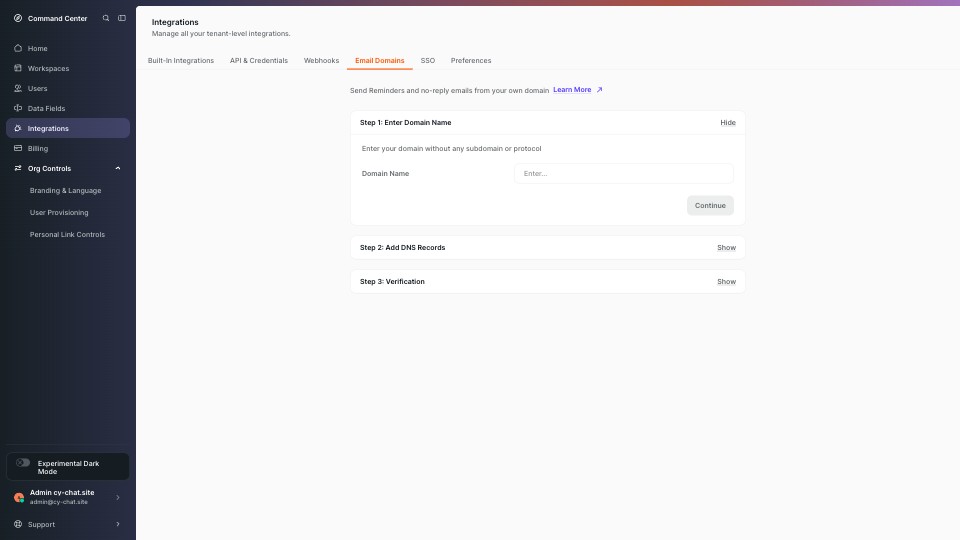
| Products | Element & selector | Interactions in tests |
|---|---|---|
| none | Sidebar — Home[data-test-id="NavItem-Home-link"][data-testid="NavItem-Home-link"] |
— no test interacts with this element — |
| none | Sidebar — Workspaces[data-test-id="NavItem-Workspaces-link"][data-testid="NavItem-Workspaces-link"] |
— no test interacts with this element — |
| none | Sidebar — Users[data-test-id="NavItem-Users-link"][data-testid="NavItem-Users-link"] |
— no test interacts with this element — |
| none | Sidebar — Data Fields[data-test-id="NavItem-Data Fields-link"][data-testid="NavItem-Data Fields-link"] |
— no test interacts with this element — |
| none | Sidebar — Integrations (active)[data-test-id="NavItem-Integrations-link"][data-testid="NavItem-Integrations-link"] |
— no test interacts with this element — |
| none | Sidebar — Billing[data-test-id="NavItem-Billing-link"][data-testid="NavItem-Billing-link"] |
— no test interacts with this element — |
| none | Sidebar — Org Controls (expand)[data-test-id="NavItem-Org Controls-link"][data-test-id="NavItem-Org Controls"] |
— no test interacts with this element — |
| none | Sidebar — Branding & Language (nested)[data-test-id="NestedNavLink-Branding & Language-link"] |
— no test interacts with this element — |
| none | Sidebar — User Provisioning (nested)[data-test-id="NestedNavLink-User Provisioning-link"] |
— no test interacts with this element — |
| none | Sidebar — Personal Link Controls (nested)[data-test-id="NestedNavLink-Personal Link Controls-link"] |
— no test interacts with this element — |
| none | Top bar — Context switcher trigger[data-test-id="ContextSwitcher-trigger-button"]button[aria-label="Open context switcher"] |
— no test interacts with this element — |
| none | Top bar — Search[data-test-id="ContextSwitcher-search-button"]button[aria-label="Open search"] |
— no test interacts with this element — |
| none | Top bar — Collapse navigation[data-test-id="Navigation-collapseButton"]button[aria-label="Collapse navigation"] |
— no test interacts with this element — |
| none | Top tab — Built-In Integrations[data-test-id="undefined-built-in"] |
— no test interacts with this element — |
| none | Top tab — API & Credentials[data-test-id="undefined-credentials"] |
— no test interacts with this element — |
| none | Top tab — Webhooks[data-test-id="undefined-webhooks"] |
— no test interacts with this element — |
| none | Top tab — Email Domains (active)[data-test-id="undefined-customDomains"] |
— no test interacts with this element — |
| none | Top tab — SSO[data-test-id="undefined-security"] |
— no test interacts with this element — |
| none | Top tab — Preferences[data-test-id="undefined-preferences"] |
— no test interacts with this element — |
| none | Step 1 — Enter Domain NameStep 1: Enter Domain Name |
— no test interacts with this element — |
| none | Step 2 — Add DNS RecordsStep 2: Add DNS Records |
— no test interacts with this element — |
| none | Step 3 — VerificationStep 3: Verification |
— no test interacts with this element — |
| none | Domain name inputinput[type="text"] |
— no test interacts with this element — |
| none | Continue buttonContinue |
— no test interacts with this element — |
| none | Footer — User section trigger[data-test-id="UserSection-trigger-button"] |
— no test interacts with this element — |
| none | Footer — Open support menubutton[aria-label="Open support menu"] |
— no test interacts with this element — |